Sunday, November 27, 2011

How to Secure Gmail

Most of my readers told me that there Gmail account is hacked so what to do, how to secure it. So am here posting a article which will hel you to secure your Gmail. With these Simple Tips you can Secure your Gmail Easily. If you want to use Google Mail in a public WiFi, put your mind at ease with these handy tips:
google, security, tip, Gmail, Hacked, Password, Protect Gmail, Hacked Gmail, Secure Gmail, Gmail Tips
Here are the Tips:-

How to Create Strong Passwords

Our passwords are the keys you use to access personal information that you’ve stored on your computer and in your online accounts. In today’s online world, having a strong password is a must. However, the problem with strong passwords is that they can be difficult to remember. If criminals or other malicious users steal this information, they can use your name to open new credit card accounts, apply for a mortgage, or pose as you in online transactions.
So am here writing about some good tips which will help you to create strong passwords.

See also: Huge List of Free Windows Software from Microsoft
1. Combine letters, numbers, and symbols. The greater variety of characters that you have in your password, the harder it is to guess.

10 best Free Online Virus Scanners

Most of us are using anti virus these days, but some time your antivirus is not helpful with some Virus and Malware. In such situation, the best you can do is use something that's free and fast. So am here posting 10 best Online Scanners which are free and easy to use.  

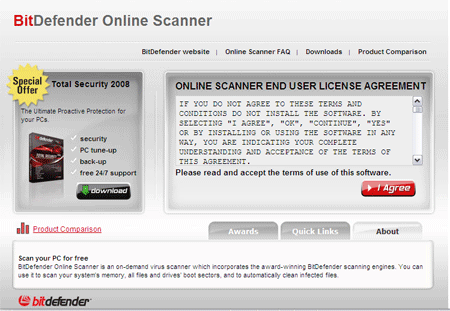
1. BitDefender – An online version of the BitDefender software. Will scan your drives, files, and boot sector. Works only with Internet Explorer.
bitdefender.gif

Introduction to DOS

The development of MS-DOS

MS-DOS is the most well known operating system, the most commercialised version is that of Microsoft, christened "MS-DOS" (there are other versions such as DR-DOS). MS-DOS was created in 1981 when it was used on an IBM PC.

Introduction to the operating system

DOS, as with any operating system, controls computer activity. It manages operations such as data flow, display, data entry amongst other various elements that make up a system.
The role of DOS is to interpret commands that the user enters via the keyboard.
These commands allow the following tasks to be executed:

A brief history of the Macintosh

This article's goal is to trace the history of Apple, Inc. through its major products, and in particular its flagship: the Macintosh.
Steve Wozniak and Steve Jobs were two high school friends to whom we owe the creation of the first Apple computers. Their first steps into the computer industry were with Hewlett Packard (for Wozniak), and Atari (for Jobs). It was Steve Wozniak who was inspired first, creating what would later become the Apple I in 1976. His friend Jobs urged him on, and on 1 April 1976, they created the company Apple Computer, in order to be able to sell the Apple I. This first machine was unsuccessful, and they had to wait until 1977 for their company's first hit, the Apple II.

Introduction to Microsoft Windows NT

Windows NT (for "New Technology") is a 32-bit operating system developed by Microsoft.
Windows NT's outward appearance makes it look a lot like Windows 95/98/Millennium, but Windows NT has a separately developed kernel. Because of this, Windows NT has the following characteristics:
  • Windows NT is a preemptive multitasking system;
  • Windows NT is a multi-user system, which means that depending on the user who is connected to the system, the interface might be different, as might system privileges;
  • Windows NT natively supports numerous network features;
  • Windows NT has more security, in particular for the file system (NTFS) as well as for the robustness of the OS.

NT, 2000, XP

History and genesis of Linux

This entirely free operating system is the brainchild of Linus B.Torvalds. At the beginning of the 90s, Torvalds wanted to create his own operating system for his graduate project. Linus Torvalds intended to develop a version of UNIX which could be used on a 80386 type architecture. The first UNIX clone which worked on a PC was Minix, written by Andrew Tanenbaum, a minimal operating system which could be used on a PC. Linus Torvalds then decided to expand the possibilities of Minix by developing what would become Linux. Amused by this initiative, a number of persons contributed to help Linus Torvalds turn this system into reality, and in 1991, a first version of the system was published. In March 1992, the first version containing almost no bug was distributed.
With the growing number of developers working on this system, the system quickly integrated free redevelopments of tools available on commercial UNIX systems. Aftwards, new tools for Linux began to appear at an incredible rate.

History of Windows

Windows is the operating system sold by the Seattle-based company Microsoft. Microsoft, originally christened "Traf-O-Data" in 1972, was renamed "Micro-soft" in November 1975, then "Microsoft" on November 26, 1976.
Microsoft entered the marketplace in August 1981 by releasing version 1.0 of the operating system Microsoft DOS (MS-DOS), a 16-bit command-line operating system
The first version of Microsoft Windows (Microsoft Windows 1.0) came out in November 1985. It had a graphical user interface, inspired by the user interface of the Apple computers of the time. Windows 1.0 was not succesful with the public, and Microsoft Windows 2.0, launched December 9, 1987, did not do much better.

Hardware Tips

Computer hardware includes the physical parts, digital circuitry inside the computer.  Different hardware components collectively make a computer unit.  Computer with weaker security settings, faulty hardware devices, misconfigurations and outdated software are suffered with different kind of problems.  Regardless of the computer hardware problems, there are few basic steps that can avoid many problems. The hardware problems lead to the error messages, system boot up problems, noise from the devices, blue screen errors and the system crash. Normally computer hardware problems are easier to resolve than the software problems.  To troubleshoot the system’s hardware related problems, you should have the right tools and techniques.  To identify the hardware failure in your system, you need to use a diagnostic utility.  It will help you to find out the right cause of the problem.

Internet Tips

The internet has become an essential part of our modern life. We cannot think of living better without this blessing. However, any error can affect our work if our lives are relying on it. For this reason, it is vital for every internet user to learn different methods for better internet performance. Here are some essential techniques and internet tips to help you with your problem.
Security tips

Highly protective and reliable security measures can save your computer from many risks. You must implement a strong firewall for the protection of your computer network. Secondly install a good type of anti Spyware and antivirus software. Home users and business professionals must do this first before using the internet.

Networking Tips

Computer networks are used to share the data and resources and for the communications. To get the optimized performance, data protection, maintenance, improved reliability and the security, every system administrator and network administrator should know the basic maintenance, troubleshooting and security techniques.  Downtime is very dangerous for the critical network business applications and servers.  In this article, you will learn some of the best networking tips and by using them you can get the optimized performance from your network.
  1. Security

How To Secure A Computer

The confidentiality, availability and the integrity of the data is the most important aspect of the computer security.  Computer security refers to securing your computer from the unauthorized access and from internal and external threats like virus, spyware, Trojan horses, phishing attacks, hackers and intruders.  There are a large number of techniques that can be used to protect your computer from all these threats.  In this article you will learn that how to secure your computer from the most common security threats through antivirus protection.

Security can be implemented from the operating system to computer hardware level.  Following is an overview of some of the common PC threats and the solutions from preventing them.
  • Computer Viruses

Saturday, November 26, 2011

Windows Xp Pro Power-Toys Tools

You can add Microsoft PowerToys to your computer to enhance Windows. PowerToys are programs that help make Windows easier or more fun to use. You can obtain Microsoft PowerToys for Windows XP free of charge at
www.microsoft.com/windowsxp/pro/downloads/powertoys.asp
You can download all or some of the PowerToy programs. Only a user with a computer administrator account can install PowerToys on a computer.

Tweak UI

Tweak UI gives you access to computer settings that are unavailable or difficult to access in Windows, including settings that affect the mouse, Start menu and taskbar. When you install Tweak UI, the PowerToy will appear on the Start menu.

Resize images Create virtual desktop Open command prompt here

There are 3 following Trix
  • How to resize images
  • How to open command prompt here
  • How to create four virtual desktop

To resize images:-

If you have to resize image frequently then this is the best software for you. With this software you can resize any image quickly without opening any heavy memory consuming software like Photoshop. And more its absolutely free, very tiny in size, one click use.
Download this image resizer software and double click to launch it.
Click next on welcome screen ==> select I accept on license agreement screen ==> Click next on customer info screen ==> Select complete on setup type ==> click on next on ready to install ==> Now click on finish.

Remove XP VISTA Window7 Server 2003 Server 2008 Password and Syskey

How many times you have to reinstall windows due to forget password of administrator or syskey? In lab scenario it's very common. Consider a situation where students form one batch was doing the practical on Server. They have set administrator password in all system and left the lab after the practical without telling you the password of Syskey and administrator. What will you do now? Format all systems No. we are telling you the way to reset the password and Syskey on window again. For demonstration purpose we are setting Syskey and administrator password on one computer.

To set Syskey password

Windows XP bootable CD Step by Step guide

This guide will help you to create a windows xp bootable cd . Some times we do copy of windows cd on hard disk. If we write these copied files on cd it will not boot. Because it will not be a windows xp bootable cd. To make it windows bootable cd you must have to add boot image file on cd. To make windows xp bootable cd follow our step by step guides. 
 
The following items are required:
  • A copy of the original Windows CD/DVD.

make Windows XP Pro unattended CD step by step guide

 If you missed the first part of this article series please read
Step by Step Guide to Create Answer Files (Part 1).
In Part 1 of this article series, I explained that how can we create answer files for windows unattended CD. In this article, I will continue the discussion where I left off in Part 1 by using the answer files to make windows pro unattended CD.
Create a folder named xpcd on c:\ drive

Copy the entire windows XP pro CD

Makes Answer File For Windows XP pro Unattended CD

Step by Step Guide to

At several points during a standard installation, Setup requires that the user provide information, such as the time zone, network settings, and so on. One way to automate an installation is to create an answer file that supplies the required information. Answer files are really just text files that contain responses to some, or all, of the questions that Setup asks during the installation process. After creating an answer file, you can apply it to as many computers as necessary.
To create answer files you need Setupmgr.exe The Windows Setup Manager Wizard tool.

What is Setupmgr.exe ?

Setupmgr.exe stands for Windows Setup Manager.
Its provides a wizard-based interface that allows you to quickly create an answer file for an unattended installation of Windows XP Professional. Windows Setup Manager enables you to create scripts to perform customized installations on workstations and servers that meet the specific hardware and network requirements of your organization.

Windows XP Live CD Step by Step guide

In this step by step guide we will learn how to make windows live CD with this windows live CD you can run XP directly from CD without installing it on hard disk. By this window live CD you can recover your system.

Complete these perquisite first
  • One windows XP bootable CD
  • One CD burning software Like Nero
  • Windows live CD Creator software
  • Windows Live CD plugin
  • 700 Mb Free space on C:\ drive

Friday, November 25, 2011

TCP/IP Made Easy

Basics to know:
  • No one "owns" the Internet, but IANA and ICANN oversee the IP & registry schemes.
  • The server that gives out IP address are DHCP
  • The server that handles www.somename.com is DNS
  • The server that handles local NETBIOS names is WINS
  • There are 32 bits that make up the present IPv4 scheme. They are grouped into 8 bits (Octets).
  • For example: 192.168.105.100 - One group is separated from the other via a "dot" or period.
  • Know your classes: A, B, C are used, D is broadcast, and E for Experimental.

LinkWithin

Related Posts Plugin for WordPress, Blogger...