Showing posts with label Security. Show all posts

Wednesday, March 14, 2012

How To Know Your Password is Strong or Not

Strong and safe password is the first way to protect your online privacy. So always make the strong password for all your online accounts to be safe. You can check out our guide here, How to Create Strong Passwords. Most of the people are using the same password on different systems, that was the bad idea always. So always make the different password for different account’s that you use. Your password needs to be totally unique. This is to make sure that in the event that one account is hacked into, your other accounts will not be affected.
strong-passwords

6 Free Ways to Track All Your Passwords

Its very difficult to remembers all of your passwords, the easy options to remebers them is using the same password each time or writing them down on paper or in a spreadsheet but that one i not so secure. In fact, security experts strongly warn against these options as they leave you vulnerable to online theft. So am here posting some of the best password managers that can help you to remember all you password safely.

Saturday, February 11, 2012

Tips to Avoid Facebook Scams


Some days back we mention about how to secure your Facebook account, which help you to protect your facebook account from hackers and spies. So today here we discuss about Facebook Scams, Facebook has been the target of some of the highest profile worms, viruses, and phishing scams on the web. So here are some tips which will help you Avoid Facebook Scams
Facebook, phishing, scam

How to secure your Facebook account


Facebook is the number one social network in the world. Its the great way to connect with others, But you could also reveal too much about yourself. But if you’d like to secure your Facebook sessions from hackers and spies, you can do this with simple and easy steps. So here we will help you to How to secure your Facebook account and guarding your privacy, protecting your personal stuff.
Here are the steps:-
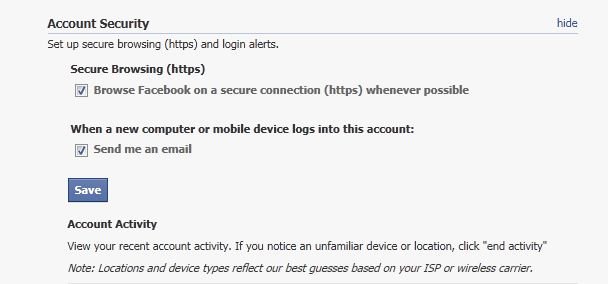
1. Enable HTTPS encryption:- This feature, which encrypts data transferred during Facebook sessions, is designed to prevent attackers from compromising users’ accounts. To do so, go to your Account Settings > Account security and enable Secure Browsing (https).
    Facebook,     Facebook hacked,     HTTPS,     security,     phishing scams,     encryption

Recovering a Hacked Facebook Account

Most of the people using Facebook account for connecting with friends. Many companies are also using Facebook to promote there brand on Facebook. But now its the real issue of individuals Facebook account getting hacked. A certain indication that your account has been hacked is not being able to log in. This happens when the scammer who hacked your account changes your password. You can’t change it back because you no longer know what it is.
If your account is hacked or compromised you can recover it easily with the help of Facebook. Here are the some ways which helps you to recover your Hacked Facebook Account.

How to Check Your Facebook Account is Hacked or Not

Has Your Facebook Account Been Hacked? Today here we will let you know How to Check Your Facebook Account is Hacked or Not. It was an easy method which help you to know about any suspicious activity on your Facebook account. If anyone hacked you Facebook Account, they will login your account and check all your activity and friends there. Recently Facebook added the new security setting feature, Which allows you to can trace out your last active session.

6 Tools for Windows Maintenance

In windows most of us are downloading, deleting and move file from here to there, and after this your windows has so many dump files and the performance is not so good as before. And most of the users don,t know hot to Maintain Windows. So am here posting 6 best tools for Windows Maintenance.

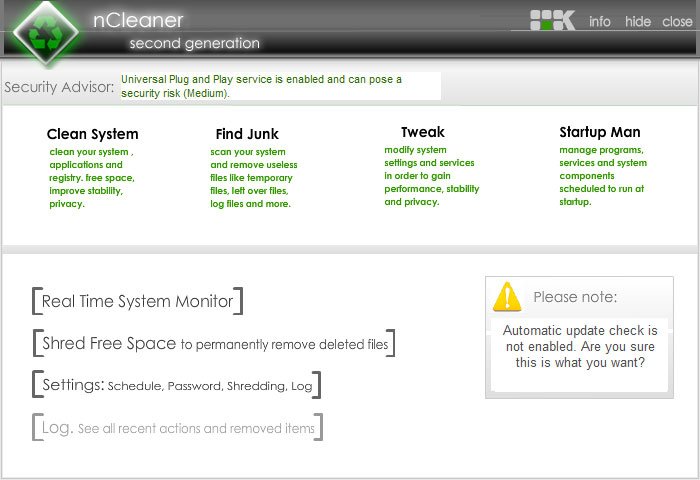
1. nCleaner


Friday, February 3, 2012

Toolwiz Care

Toolwiz Care is a free tool set designed to speed up your PC and give your system full care. With multi-functional optimization suite, this software provides a collection of tools that includes System Checkup,System Cleanup,System Speedup,System Virtualization and 40+ powerful tools to enhance PC performance, security, and to optimize the start-up procedure. Toolwiz guarantees users that the freeware will stay free. This tool suite is designed for all levels of PC users from beginners to experts.
Latest Version: 1.0.0.502
Operating System:Windows XP/Vista/7/8
Category:Diagnostic Software
File Size: 3.9 M
 

Saturday, December 10, 2011

Block Or Unblock Websites without software Part#2

There are many reason why you need to know how to block a website. Some of the most common reasons are you have been targeted by spammers who use adware and popups to attack your PC. Other reasons may be to prevent your children from having access to certain site content such as porn and gambling.

Depending on the level of security you wish, learning how to block a website may require a adjustments of your web browser, the use of internet filtering software or editing of your host file. At any rate you can try all methods to see which works best for you.

Block a Website using Internet Explorer:
Internet Explorer version 5 and later offer the ability for heighten security and privacy. You can block a site by following the directions below:

Friday, December 2, 2011

Block Or Unblock Websites without software Part#1

Many times in schools, colleges & offices surfing some sites like orkut,etc are banned !
To overcome this you can unblock these or block some other websites and play pranks!

Do The Following:
For e.g. you want to block www.xyz.com!
* Open the folder C:\WINDOWS\system32\drivers\etc
* There you will find a file named HOSTS
* Click on the file and press SHIFT and now right click on it.
* From the right click menu select open with.

How do you choose a good password?

1. Don't use words that can be found in any dictionary of any language
2. Develop a mnemonic for remembering complex passwords
3. Don't use passwords that are based on personal information that can be easily accessed or guessed

10 Tips for securing your PC


1. Update / patch ALL your software every now and then!

2. Check / adjust ALL your settings so they are safe, since them ARENT by default!

3. Use firewall, like Zone Alarm!

Sunday, November 27, 2011

How to Use Multiple Gmail Accounts Feature

Gmail is one of the awesome mail client and most of us are using it regularly. But many people today have two or more Gmail Accounts in order to separate and organize their online communications. So it a difficult task to them Login each account every time and check out there mails. But with the new Multiple Gmail accounts feature you can easily access your Multiple gmail account on the same browser window.
With this new feature If you’ve registered more than one Gmail username, you can use the multiple sign-in feature to use two accounts at once. So no need to login in again and again for each account, read the email in that inbox, sign out, and then repeat the process for each additional account.
Access-Multiple-Gmail-Account

How to Know Gmail is Hacked or Not


These Days Most of the Users are Using Gmail Mail Box, Your email account can contain a lot of personal information, from bank alerts to love letters. So you don,t want to Share all these Mail with others. And most of the time you worried about hacking of your Gmail Account.

Now Google Gmail has a new feature which helps you know about the Activity of You Gmail account, From that you know when and from which IP you are using your Gmail Account. This will helps you to track the Activity of your Gmail Account. To Know whether your Gmail Account is Hacked or Not you have to Use this New Feature.

How to Secure Gmail

Most of my readers told me that there Gmail account is hacked so what to do, how to secure it. So am here posting a article which will hel you to secure your Gmail. With these Simple Tips you can Secure your Gmail Easily. If you want to use Google Mail in a public WiFi, put your mind at ease with these handy tips:
google, security, tip, Gmail, Hacked, Password, Protect Gmail, Hacked Gmail, Secure Gmail, Gmail Tips
Here are the Tips:-

How to Create Strong Passwords

Our passwords are the keys you use to access personal information that you’ve stored on your computer and in your online accounts. In today’s online world, having a strong password is a must. However, the problem with strong passwords is that they can be difficult to remember. If criminals or other malicious users steal this information, they can use your name to open new credit card accounts, apply for a mortgage, or pose as you in online transactions.
So am here writing about some good tips which will help you to create strong passwords.

See also: Huge List of Free Windows Software from Microsoft
1. Combine letters, numbers, and symbols. The greater variety of characters that you have in your password, the harder it is to guess.

LinkWithin

Related Posts Plugin for WordPress, Blogger...